A custom Maya node that can be found here:
https://github.com/parzival-roethlein/prmaya
A few months ago I started making improved array versions of Maya nodes for smaller, scalable, procedural graphs.
The prKeepOut node specifically had some relevance for production: I had an asset with around a hundred armor pieces and I thought about using keepOut nodes, but ended up deciding against them because it would have been overkill: Each armor piece would have required multiple keepOut nodes, which would have slowed down the rig a lot, take a long time to setup and probably never really work that well, because of multiple armor pieces overlapping in areas with multiple deformation axes. In the end I copied the skinCluster and blendShapes from the body and tweaked them to make the armor deform more rigid and add some offset controls for a few of the armor pieces.
It took me a few evenings after work to write prKeepOut, so in hindsight I wondered why I hadn't done it sooner. The "algorithm" is less than 100 lines and the rest is just the verbose Maya API way of creating/querying/setting attributes.
I thought about writing more about the making-of and reasoning. But it's open source and just basic Maya API, linear algebra usage. And I imagine the changes make sense to anyone who has used the 10 year old Maya keepOut node.
Initially I had shape inputs specific for each ray to support multi layer collision, but removed it again, because it would make the node usage too complex and risk evaluation cycles.
With the recent input matrix announcement for transforms in Maya 2020+ I'm thinking about switching to matrix outputs.
A few weeks later Autodesk announced bifrost graph, which looks amazing and will hopefully make these kind of custom nodes obsolete.
Showing posts with label maya api. Show all posts
2019-12-31
2018-10-11
Maya API ramp attribute bug?
1. When saving:
2. What gets stored in the ascii file:
setAttr -s 2 ".falloff[1]" 1 1 1;
3. After opening the scene again:
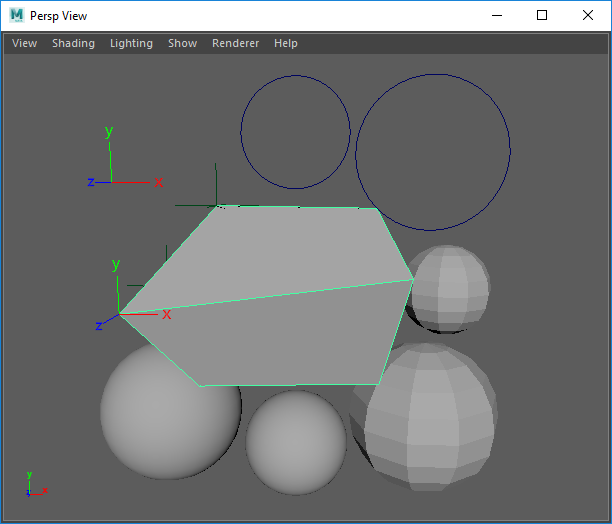
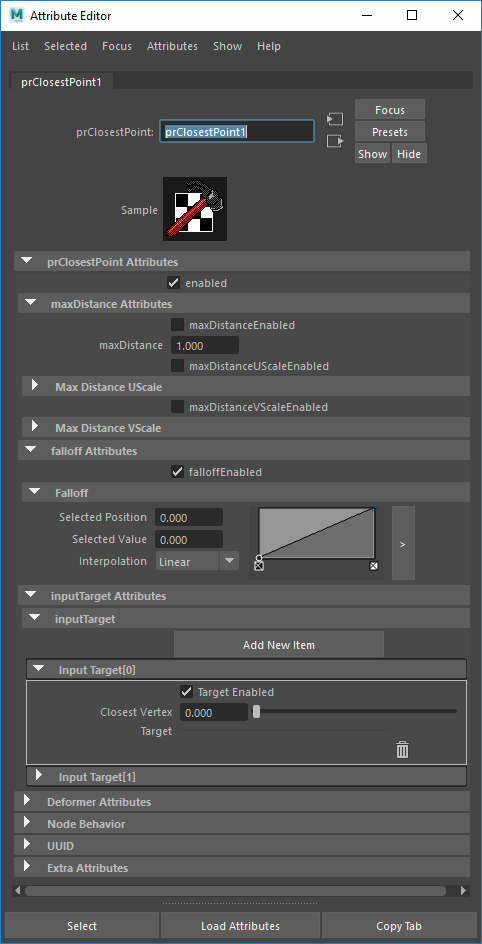
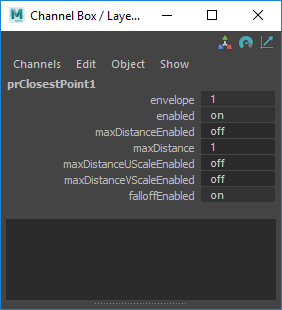
I recently noticed in Maya 2018 that custom Python API 1.0 node ramp attribute elements with position/value/interpolation : 0.0/0.0/linear do not get saved with the Maya scene (if their index is the lowest). I guess this is a bug. Some debug infos I gathered:
- Probably bug source: By default Maya does not save attribute default values
- Does not happen with default Maya nodes like remapValue
- MPxNode.shouldSave documentation explains why this should not happen (but it is not true): "This method is not called for ramp attributes since they should always be written."
- Since shouldSave gets wrongfully called it has to be overwritten to fix the problem
- Only returning 'unknown' will not save the attribute. OpenMayaMPx.MPxNode.shouldSave(...) does exactly that.
- The Python devkit example of shouldSave pyApiMeshShape.py is a bit misleading: From what I have tested all these return values seem to force save: True, False, None
Implementations of this workaround can be found in prClosestPoint:
https://github.com/parzival-roethlein/prmaya
Update 2020-03-31:
Another situation with the same problem was with a float array attribute in Python API 2.0. The fix is in my /plugins/prUpCurveSpline.py:
https://github.com/parzival-roethlein/prmaya
Update 2020-03-31:
Another situation with the same problem was with a float array attribute in Python API 2.0. The fix is in my /plugins/prUpCurveSpline.py:
https://github.com/parzival-roethlein/prmaya
2018-10-09
prPyMath.py making-of
A custom Maya node that can be found here:
https://github.com/parzival-roethlein/prmaya
Direct file link:
https://github.com/parzival-roethlein/prmaya/blob/master/prmaya/plugins/prPyMath.py
Origin
I wanted to create a node for some trigonometry functions, so I don't have to pollute the node graph with expressions. But after noticing that the functions I needed are all part of the Python math module I decided to just wrap the whole module, to make the node more useful.
There are only a few repeating argument in the whole module and all functions return one or two numbers. Which means there are also few Maya attributes needed to cover all cases.
Usability
A math node with that many operations is not typical for Maya.
When comparing such general purpose math nodes it might be better to just use a Python expression node like this one: http://around-the-corner.typepad.com/adn/2012/08/a-mathematical-dg-node.html
Code
It was the first time I used the Maya Python API 2.0 for an MPxNode. But in this simple case it did not make a big difference. For the Attribute Editor buttons "Create element", "Delete element" I had to look into querying the node in the Attribute Editor context for the first time. Currently it is a workaround with a hidden textfield. I guess a global MEL variable might be the proper way to handle that?!
https://github.com/parzival-roethlein/prmaya
Direct file link:
https://github.com/parzival-roethlein/prmaya/blob/master/prmaya/plugins/prPyMath.py
Origin
I wanted to create a node for some trigonometry functions, so I don't have to pollute the node graph with expressions. But after noticing that the functions I needed are all part of the Python math module I decided to just wrap the whole module, to make the node more useful.
There are only a few repeating argument in the whole module and all functions return one or two numbers. Which means there are also few Maya attributes needed to cover all cases.
Usability
A math node with that many operations is not typical for Maya.
When comparing such general purpose math nodes it might be better to just use a Python expression node like this one: http://around-the-corner.typepad.com/adn/2012/08/a-mathematical-dg-node.html
Code
It was the first time I used the Maya Python API 2.0 for an MPxNode. But in this simple case it did not make a big difference. For the Attribute Editor buttons "Create element", "Delete element" I had to look into querying the node in the Attribute Editor context for the first time. Currently it is a workaround with a hidden textfield. I guess a global MEL variable might be the proper way to handle that?!
prClosestPoint.py making-of
A "new" Maya deformer that can be found here:
Origin
Initially I just wanted to update my old prAttractNode from 2011 to work in Maya 2016+, for which I only had to update the envelope, inputGeom, outputGeom attributes (MPxGeometryFilter instead of MPxDeformerNode). But then I also added new attributes and changed the existing ones to make it more user-friendly, scalable, functional:
Direct file link:
Origin
Initially I just wanted to update my old prAttractNode from 2011 to work in Maya 2016+, for which I only had to update the envelope, inputGeom, outputGeom attributes (MPxGeometryFilter instead of MPxDeformerNode). But then I also added new attributes and changed the existing ones to make it more user-friendly, scalable, functional:
- Added positions as target option
- Set all target type attributes to arrays
- Made all targets work simultaneously
- Added on/off switch attributes
Usability
In production I mostly used prAttractNode when modeling. For sticky lips only once or twice. But that might be because of the kind of stylized projects I usually work on. It could be much more useful for visual programming, but many nodes are still missing for that in Maya. Python is also too slow for that, unless the affected vertex count is small enough.
Code
I would have liked to switch to the Python API 2.0, but the deformer proxy class has not been ported yet.
For the mesh input I switched from MMeshIntersector to MFnMesh, which is slower. I was having issues getting the matrix for MMeshIntersector to work. I used it in the past (see prAttractNode) so it might be a new bug, or I just made a mistake. On the upside it is more user friendly to not require the matrix input for mesh shapes.
Thoughts
The past ~5 years I haven't written any deformers with the Maya API. I mostly used it in Python scripts to improve performance and to use API exclusive features.
I find it strange that basic classes like MPxDeformerNode are still missing in the Maya Python API 2.0 after having tried it for the first time in early 2013.
A visual programming / procedural node option like Softimage ICE, Fabric Engine, Houdini would be a much better fit for most of my deformer needs. I was anticipating something similar for Maya in 2011, but after so many years and seeing what happend with Softimage and Fabric I have no idea if / when it will ever happen.
The verbose low level nature of C++ Maya deformers only seemed to have increased with the new MPxGPUDeformer class. I haven't really looked into it yet, but the devkit example MPxoffsetNode.cpp has ~600 lines of code for a simple one line vector offset algorithm. That seems quite far away from production problem solving and applied math that I would like to focus on when creating a deformer.
Thoughts
The past ~5 years I haven't written any deformers with the Maya API. I mostly used it in Python scripts to improve performance and to use API exclusive features.
I find it strange that basic classes like MPxDeformerNode are still missing in the Maya Python API 2.0 after having tried it for the first time in early 2013.
A visual programming / procedural node option like Softimage ICE, Fabric Engine, Houdini would be a much better fit for most of my deformer needs. I was anticipating something similar for Maya in 2011, but after so many years and seeing what happend with Softimage and Fabric I have no idea if / when it will ever happen.
The verbose low level nature of C++ Maya deformers only seemed to have increased with the new MPxGPUDeformer class. I haven't really looked into it yet, but the devkit example MPxoffsetNode.cpp has ~600 lines of code for a simple one line vector offset algorithm. That seems quite far away from production problem solving and applied math that I would like to focus on when creating a deformer.
2013-07-07
Demoreel 2013
Password on request
Edit in 2015: No more password
Parzival Roethlein - Character TD Reel 2013 from Parzival Roethlein on Vimeo.
Edit in 2015: No more password
Parzival Roethlein - Character TD Reel 2013 from Parzival Roethlein on Vimeo.
2013-02-11
prHeatDeformer
update: fStretch is open source since 2015-03 http://www.cgaddict.com/
Description
I recently finished a heat/tension based deformer / Maya-API plug-in. Depending on the amount of stretching and compression on the surface, vertices get deformed along the normal or with blendshapes. The most common application would be to blend in wrinkles on skin and clothing.
Motivation
To have an extra tool to improve deformation for many different types of rigs. I was also personally interested in the subject, and I had some downtime between projects.
Video
prHeatDeformer - deformer (custom node) from Parzival Roethlein on Vimeo.
Breakdown
In retrospect I was surprised how quickly it was done. Especially if I had skipped the Python API implementation. Because it is one of the more technical and difficult tasks in rigging, it also feels quite rewarding when you get it done.
Todo
Additional features and performance improvements
Related
Description
I recently finished a heat/tension based deformer / Maya-API plug-in. Depending on the amount of stretching and compression on the surface, vertices get deformed along the normal or with blendshapes. The most common application would be to blend in wrinkles on skin and clothing.
Motivation
To have an extra tool to improve deformation for many different types of rigs. I was also personally interested in the subject, and I had some downtime between projects.
Video
prHeatDeformer - deformer (custom node) from Parzival Roethlein on Vimeo.
Breakdown
- I had not used the Maya API for over half a year, so I was a bit rusty at first.
- I always had to take a break when there was a project I had to work on. Which is less efficient for me than continuously working on it, because it always takes a bit to get back into it.
- The first two weeks were spent writing a complete Python API version. I implemented all features, but with little calculation optimization. I always like writing Python versions, because you do not have to compile, so the iterations are really fast. On the downside I have to use a lot of printing and complex debugging is actually more easy in C++ / Visual Studio, because you can set breakpoints and use "attach to process" for interactive debugging, which I used the first time on this plug-in. So in retrospect it definitely would have been faster to skip the Python version. But I got more experience with the Python API.
- After the Python version was working (and terribly slow) I wrote the C++ version in one week. This was the hardest part, because I had to implement a lot of performance increasing stuff, so that the deformer does not slow down the rig as much. There will definitely be a geometry resolution switch for the animators, but I still want them to be able to see the heatdeformed highres mesh with decent speed and also when working with it as a rigger it is always better to have the deformer as fast as possible. To make the deform fully production ready it had to work with transforms that have any number of shapes and each shapes vertices can be inside or outside of the deformer membership. Combined with the speed improvements they were the most difficult things to get done.
- I wrote a lot of common features for the first time (tangent space, smooth, grow, some of the speed optimizations). So that slowed me down. And will improve development time on future nodes.
- The Python version has 800 lines, the C++ version 1400 lines (including header file, comments etc)
In retrospect I was surprised how quickly it was done. Especially if I had skipped the Python API implementation. Because it is one of the more technical and difficult tasks in rigging, it also feels quite rewarding when you get it done.
Todo
Additional features and performance improvements
Related
- (2007) Siggraph 2007 presentation "Realtime wrinkles, Christopher Oat": This is the oldest reference I could find for this idea. The second half has "dynamic wrinkles" that are tension based.
- (2008 or earlier) The Maya (Comet) muscle skinDeformer has a "wrinkle" option included to the "relax" feature. It moves vertices along the normal vector when being compressed. This feature is not usable, because there is only one global attribute to control the strength and one paintable map. So there is no limit and no way to control the acceleration etc. And the biggest problem is that the algorithm does only work properly on primitive geometry (sphere,..) because it is only considering neighbor vertices that have continuous numbering (or a random one, if there is no proper neighbor id). This is a bit hard to explain, but the result on a production mesh is that it calculates the compression differently on neighbor vertices (except if you scale everything from the same pivot), so you get spikes and have no real control over the shape.
- (2010) fStretch: I think this is the most well known version of this technique. It is a commercial plug-in by Matthieu Fiorilli. It seems very sophisticated, but it is a commercial plug-in that costs money/effort and the license model is not so good for the place I work at.
- (2012) tenshionBlendshape: Inside of the SOuP plug-ins, it does not have tangent space, which makes it unusable and I also did miss some other features and the base algorithm also had some problems with different sized geometries. I did send them the feedback thou, so maybe some day there will be a usable free version of this technique.
2012-12-25
prAttractNode
I never made an extra blog post for my prAttractNode. So since I just uploaded an update and also made a better demo video with more useful work examples (Read Vimeo description for explanation), I think it is a good time.
The plug-in is open source (download link in Vimeo description), so the following Maya API parts might be useful to others:
- How/Where to properly initialize a ramp attribute
- How to setup everything in a single .py/.mll file, for easy installation
- (C++) OpenMP usage (Extra blogpost: https://pazrot3d.blogspot.com/2012/01/openmp-and-maya-api.html )
prAttractNode - deformer (custom node) from Parzival Roethlein on Vimeo.
The plug-in is open source (download link in Vimeo description), so the following Maya API parts might be useful to others:
- How/Where to properly initialize a ramp attribute
- How to setup everything in a single .py/.mll file, for easy installation
- (C++) OpenMP usage (Extra blogpost: https://pazrot3d.blogspot.com/2012/01/openmp-and-maya-api.html )
prAttractNode - deformer (custom node) from Parzival Roethlein on Vimeo.
2012-01-30
Maya API and openMP multithreading
In this post I want to write about the steps necessary to compile a Maya plug-in, that uses openMP multithreading, with Visual Studio. I assume the reader has compiled a Maya plug-in before.
Summary:
Detailed explanation:
Writing the code is fairly straightforward (it's not a lot) and the Autodesk Maya API Guide and Reference explain openMP really well. (Check out the splatDeformer devkit example)
Now I will write the steps necessary to get the splatDeformer running (I am using Visual Studio 2008 and Maya 2010, 2011, 2012 all 64bit):
For a more complex deformer example than splatDeformer, that is using openMP, check out my prAttractNode. I noticed an increase in performance of 10-30% from openMP. You can find the open source download link in the Vimeo description of this video:
prAttractNode - deformer (Maya API, plug-in, Python)
Summary:
- Enable openMP option in project properties
- Don't use Visual Studio Express/Standard
- Switch to Release in "Solution Configuration" to use the plug-in (.mll) on other PCs
Detailed explanation:
Writing the code is fairly straightforward (it's not a lot) and the Autodesk Maya API Guide and Reference explain openMP really well. (Check out the splatDeformer devkit example)
Now I will write the steps necessary to get the splatDeformer running (I am using Visual Studio 2008 and Maya 2010, 2011, 2012 all 64bit):
- Open the splatDeformer.sln in the Maya devkit folder (if you copy it somewhere else you have to fix the \lib and \include paths)
- You should be able to compile the solution already. (If not, there is probably something non-openMP related not working)
- It's compiling because openMP is actually disabled by default in the solution and the openMP code is not used. To enable it you have to set splatDeformer: Properties > Configuration Properties > C/C++ > Language > OpenMP Support > Yes (/openmp)
- If you are using the Express or Standard edition of Visual Studio you will get the following error:
fatal error C1083: Cannot open include file: 'omp.h': No such file or directory
- That's because the Express/Standard edition do not support openMP. You can find some tutorials on how to install openMP manually. But I can not confirm that they are working in this case, because I switched to the professional version at my school.
- So with a Visual Studio version, that supports openMP, you should be able to compile the plug-in successfully. And maybe it will work on your PC, but most likely not on other PCs. The error should be:
Error: The application has failed to start because its side-by-side configuration is incorrect. Please see the application event log or use the command-line sxstrace.exe tool for more detail.
- To fix this you have to switch your Visual Studio "Solution Configuration" from Debug to Release. (Note: Release may have different Configuration Properties, so you may have to enable OpenMP Support again and set output file, etc). More experienced Visual Studio users will know this error, because it also happens if you don't use the Release mode and try to load your output file with Maya on another PC (that does not have Visual Studio installed). More information on that point (bug report)
For a more complex deformer example than splatDeformer, that is using openMP, check out my prAttractNode. I noticed an increase in performance of 10-30% from openMP. You can find the open source download link in the Vimeo description of this video:
prAttractNode - deformer (Maya API, plug-in, Python)
2012-01-26
Maya API resources
Because I uploaded a few open source Maya Plug-ins on CreativeCrash I got some e-mails regarding basic Maya API learning material. So I wanted to write a small summary in this post, mainly to plug the free video webcast with exercises from the Autodesk Developer Center:
Maya (intermediate) (select from in the "Course" menu. There area also other Maya API courses, but I could not do any of them yet) [Updated link: https://www.autodesk.com/developmaya]
But mostly I use:
- Autodesk Maya API Guide and Reference
- Comet Cartoons (Michael Comet) Very practical information when writing code. Especially when using different attribute types for the first time.
And during my internship at Framestore I had a chance to see the two DVDs, which sadly don't seem to be for sale anymore:
- Writing Creature Deformers (Erick Miller). Introduction to deformers. Also a good starting point when writing your own skinCluster, cluster or partial blendshape node. This DVD was not that useful for me, because I had written a deformers already, so there were only a few small things interesting for me. But if you are starting then this DVD will certainly safe you a few days of learning.
- Introduction to the Maya API (Barbara Balents)
The pdf Skinning in Maya at Industrial Light & Magic (Andrea Maiolo) gives detailed information on how to managa skinCluster data including paintable attributes.
ChadVernon.com is a nice blog as well and there is also a list of resources.
Maya (intermediate) (select from in the "Course" menu. There area also other Maya API courses, but I could not do any of them yet) [Updated link: https://www.autodesk.com/developmaya]
But mostly I use:
- Autodesk Maya API Guide and Reference
- Comet Cartoons (Michael Comet) Very practical information when writing code. Especially when using different attribute types for the first time.
And during my internship at Framestore I had a chance to see the two DVDs, which sadly don't seem to be for sale anymore:
- Writing Creature Deformers (Erick Miller). Introduction to deformers. Also a good starting point when writing your own skinCluster, cluster or partial blendshape node. This DVD was not that useful for me, because I had written a deformers already, so there were only a few small things interesting for me. But if you are starting then this DVD will certainly safe you a few days of learning.
- Introduction to the Maya API (Barbara Balents)
The pdf Skinning in Maya at Industrial Light & Magic (Andrea Maiolo) gives detailed information on how to managa skinCluster data including paintable attributes.
ChadVernon.com is a nice blog as well and there is also a list of resources.
Subscribe to:
Posts (Atom)